Choosing a model
Pick Quick, Balanced or Best without knowing a model by name, hide the ones you never use, and compare them on public scores.
Updated November 27, 2026For everyone
BeyondBridge gives you more than thirty AI models from many makers, and you do not need to know any of them by name. Every model picker opens on three plain choices, Quick, Balanced and Best, each with the model it runs and what a question usually costs. When you want to see why one model beats another, the Model benchmarks page compares them on public scores.
The model button
The model button sits in the toolbar of Ask Intelligence. It shows your current choice, the name of the model behind it and what one typical question costs, for example Quick, a model name and a price. When you pick a model that is not one of the three choices, the button shows the model and its price only. If only one model is on offer, there is nothing to choose and the form says Runs on and names it.
The Playground uses a plain Model list instead, with every model by maker. An agent carries a model of its own in its form.
Quick, Balanced and Best
Click the button to open Choose a model. The three choices come first:
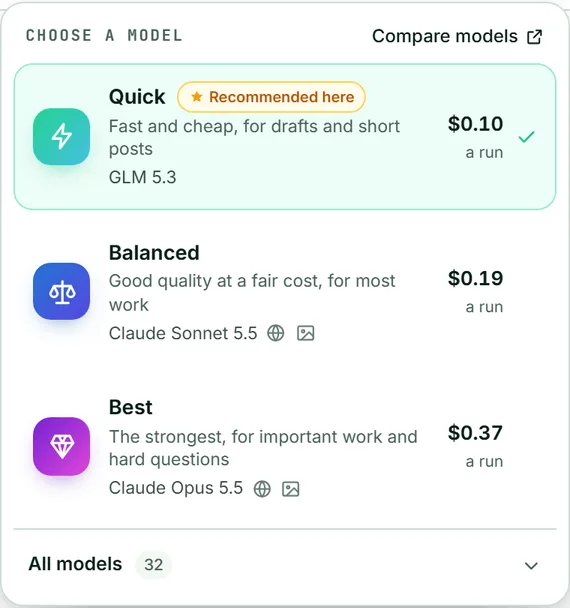
Each card names the model it runs, shows a small globe when that model can search the web and a picture icon when it can read images, and gives the price of one run with a run under the amount. Click a card to use it. The popover closes and the button shows your new choice. The exact price shows next to each answer, and the charge goes on your balance.
Recommended here
One card carries a Recommended here star. It marks the default, the model that runs when nobody picks. Picking the starred card means “follow the default”: if the default changes later, your questions move with it. Any other card, or a model from the full list, is a standing choice of that model.
What the price means
The price on a card is a typical question on that page, as billed to your organization. A real one costs more on a long question or a long thread and less on a short one. The price is shown before you ask, and charged as shown under the answer.
All models
Under the three cards, All models unfolds the full list with the number of models next to it. It holds every model your organization allows, minus the ones you switched off in My models, grouped by maker, each with its price and the same web search and image icons.
- The default carries a Default tag.
- Type in Search a model or a provider to narrow the list. When nothing fits, it says No model matches.
- The list opens by itself when the model you are on is not one of the three choices.
- With Web search switched on in Ask Intelligence, the cards and the list keep only the models that can search.
The arrow keys move from one option to the next, Enter picks and Esc closes the popover without changing anything. The picker remembers your choice in this browser. On another browser or device, you start from the default again.
My models
Every model your organization allows is switched on for you, including the models added later. That is a long list when you only use three. My models lets you switch off the ones you do not want to see. They leave your own lists, and nothing changes for anybody else.
- Click your picture or your initials at the top right of any page.
- Choose User Settings.
- In the index on the left, under Preferences, click My models.
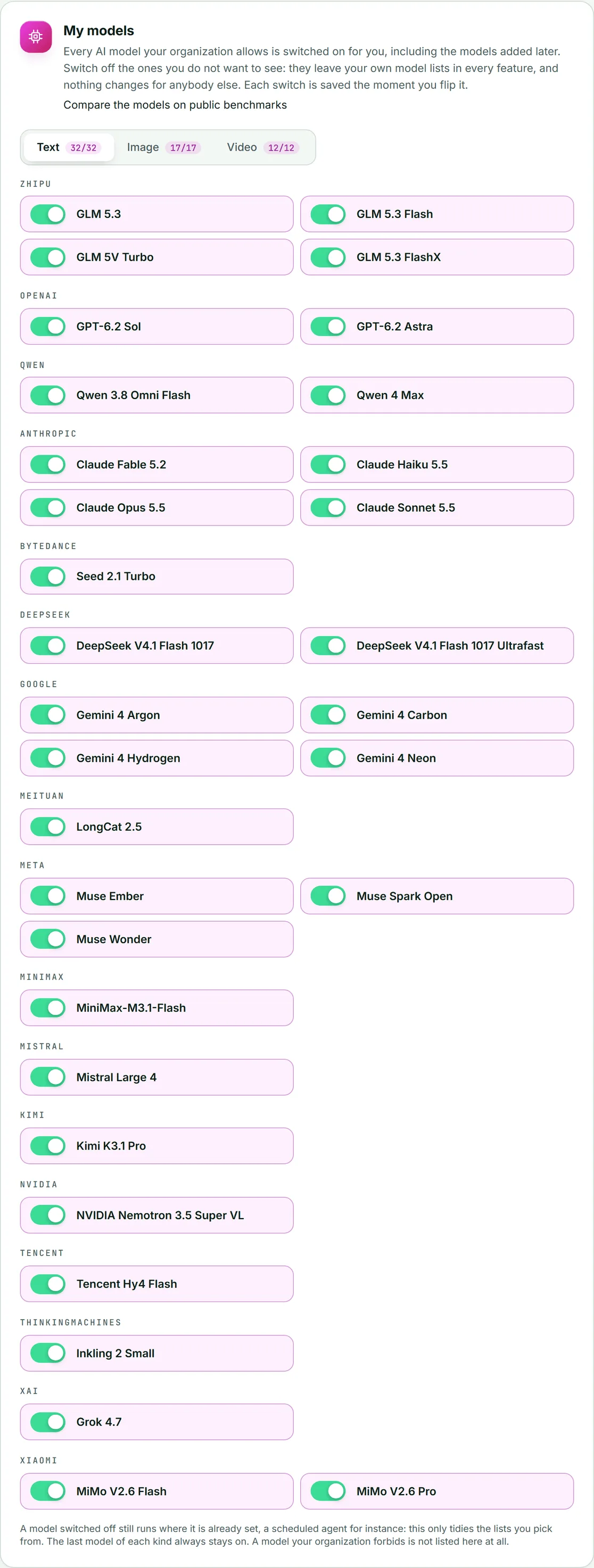
What changes, and what does not:
- A switched-off model leaves the model button, the Playground list and the image and video lists.
- Your colleagues’ lists do not change. My models is yours alone.
- A model already set somewhere, such as an agent’s model, still runs there. The card only tidies the lists you pick from.
- If you switch off the model behind Quick, Balanced or Best, the choice stays in your picker and runs on the closest model in price that you kept: a cheaper one first for Quick, a stronger one first for Best.
- The last model of a kind stays on. The card refuses with Keep at least one text model switched on. (or image, or video).
- New models arrive switched on.
Everyone with an account, Viewers included, sets their own card. Switching models on or off is free.
Models your organization does not allow
A model can be taken away from a whole organization. A model that is not allowed is gone from every list, including the card above, and a run that still asks for it is refused with a sentence. At least one model of each kind always stays allowed. To change what your organization allows, write to the BeyondBridge team through Contact us in the footer.
Model benchmarks
Model benchmarks shows how the text models compare on public, independent benchmarks. There are two ways in:
- Compare models, at the top of the model picker. It opens the page in a new tab, so your conversation stays as it was.
- Model benchmarks in the footer of every page, or Compare the models on public benchmarks under the title of the My models card.
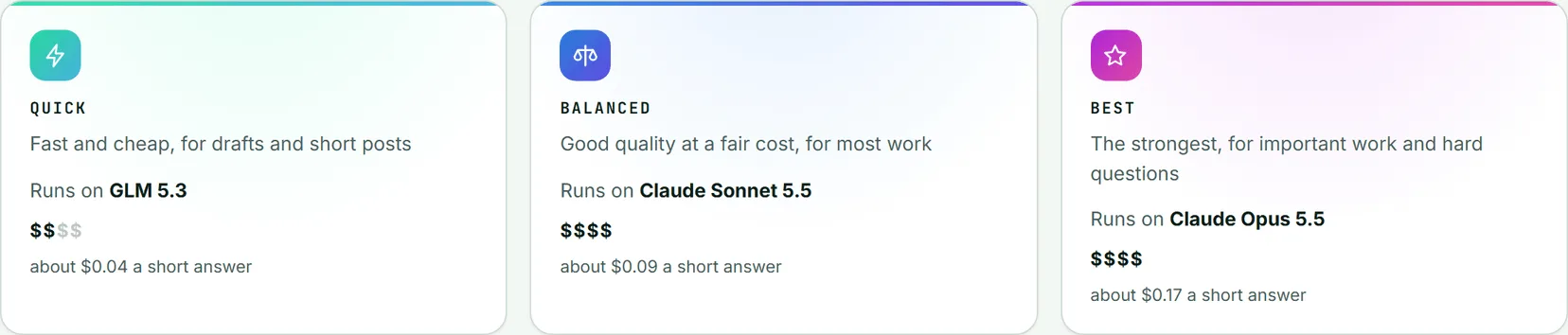
The page opens on three tabs, Text, Image and Video, each with a count. The text tab starts with three cards, Quick, Balanced and Best, each with the model it runs for your organization after Runs on, a price mark from $ to $$$$ and a line such as “about $0.04 a short answer”, the cost of one short answer on it. The price mark says how dear a model is next to the others. A choice with no model left to run shows Not available here.
| Column | What it shows |
|---|---|
| Model | The model’s name and maker, a tag for the choice it runs, and icons for web search and image reading |
| Price | The price mark, from $ to $$$$ |
| Intelligence Index | An overall score that blends nine hard tests of reasoning, knowledge, coding and agent work |
| LMArena Text | A rating built from blind votes in which people pick the better of two answers |
| Output speed | How many tokens the model writes per second once it starts |
| Humanity’s Last Exam | About 2,000 very hard expert questions; even the best models score well under 100% |
| GPQA Diamond | Graduate-level science questions that are hard to answer even with a web search |
| tau2-bench Telecom | A customer support conversation in which the model must use tools and follow the rules |
| A short answer, A long answer | What one short answer of a few paragraphs and one long answer, the length of a long article, cost on that model, everything included |
Click a column heading to sort by it. Scores sort strongest first, prices cheapest first, and a second click turns the order around. Provider narrows the table to one maker, and Every provider shows them all again. Every score is a link to the public page it was read on. A dash means there is no public figure for that model: no score is ever estimated. The date the scores were read shows under the card’s title, and the last card, What the benchmarks measure, describes each test.
A high score on one test does not make a model better at everything. Benchmarks rank models on other people’s questions. To see how two or three of them handle your own material, send the same message through Compare in the Playground: each answer shows its own price.
Who can do what
| Action | Who |
|---|---|
| Pick a choice or a model when asking | Anyone allowed to ask |
| Open Model benchmarks | Everyone with an account |
| Hide models from your own lists in My models | Everyone, for themselves |
Opening the picker or the benchmarks page costs nothing. A question is charged on the model that actually answered it. See Balance and billing and Account and settings.